PMS uses advanced technology to identify vehicles using cards, tickets, or license plates in real-time. Here’s an overview of how our system can transform your parking lot operations.
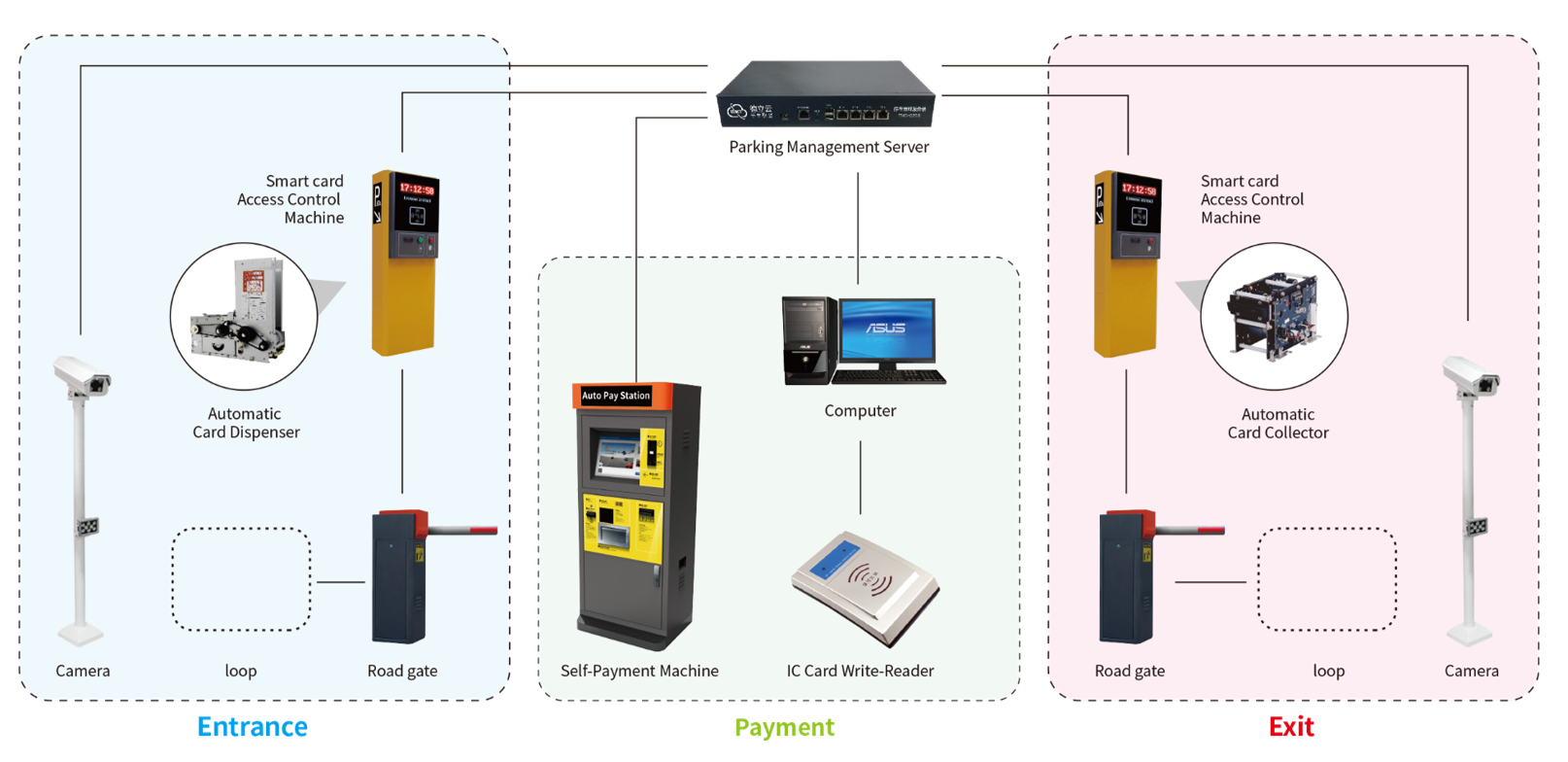
Overview of PMS
PMS offers an intelligent solution for parking lot management, including:
- Permit/Reject: Allows or denies access based on pre-set rules.
- Guidance: Directs vehicles to available parking spots.
- Recording: Keeps detailed records of all entries and exits.
- Charging: Automatically calculates and collects parking fees.
- Release and Access Control: Manages the movement of vehicles and personnel securely.
🏆 Deployed at Scale: Bashtil Train Station
The Bashtil - Upper Egypt train station is a newly inaugurated major hub in Giza, serving citizens traveling to and from Upper Egyptian governorates to alleviate congestion at Ramses Station.
Built over 60 feddans, it includes 11 platforms and is expected to serve 250,000 commuters daily. The station features 184 electronic gates, surveillance cameras, and a multi-story parking lot managed by PlateauTec.
This system ensures detailed data recording and automatic charge calculation, enhancing the safety and efficiency of on-site vehicle management across various public transportation integrations.
How It Works
Entry Process
At the parking lot entry point:
- Ticket/Card Generation: A machine generates a ticket or card with the press of a button.
- Time of Entry Record: The vehicle’s entry time is recorded via visible timestamp, QR code, barcode, or digitally on the card’s magnetic strip.
- Access Credential Presentation: The parker presents their access credentials at the entry box or control pedestal.
- Approval and Recording: Once approved, the transaction data is recorded in the parking management software, and the barrier gate opens.
Exit Process
Upon exiting:
- Barrier Operation: The barrier gate opens when the user inserts a card into the machine, or a sensor successfully scans the ticket.
Detailed Software Features
Login & Security
- Username and Password: Input your credentials to log in based on specific role permissions. The default admin username is "admin".
Cashier Module
- Focus on Ticket Field: Click on the ticket field to begin.
- Scan QR-Ticket: Use a QR-reader to scan the parker’s ticket.
- Display Ticket Data: The system displays the ticket data and the exact amount due.
- Collect Payment: Collect the amount and press the cashier icon to complete the transaction.
- Subscription Conversion: Convert a standard ticket into a membership account directly from the cashier screen.
Membership & User Management
- Fill Member Data: Include all member data for VIP access via plate number scanning or standard card scanning (Plate and Membership numbers are mandatory).
- Voucher Management: View member details, create new vouchers, display history, and settle charges.
- System Users: Admins can display all users, edit data, update passwords, and set specific module permissions.
Download Software & Drivers
Download the latest software version of the PMS system and its required dependencies below. Please contact our support team for hardware specifications and licensing information.
.NET Framework 8.0 Runtime
↓ Download Offline Installer (215 MB)To ensure the best performance and full compatibility with our latest application release, please install .NET 8.0 before running the setup. This includes important runtime improvements and security enhancements.
.NET Framework 4.8 Runtime
↓ Download Offline Installer (118 MB)Required for specific legacy components. Windows Server 2019 fully supports .NET Framework 4.8. Installing it in advance guarantees a stable experience and prevents avoidable troubleshooting.
System.Data.SQLite (32-bit Windows)
↓ Download Setup Bundle (18 MB)This package installs necessary runtime components for the x86 version of SQLite 1.0.118.0. Includes Visual C++ 2015 Update 3 runtime.
Hardware Drivers & Support Tools
↓ Xprinter Driver ↗ Get AnyDeskAnyDesk is a free-to-use program that allows our support team to access your terminal remotely and securely to assist with configuration.
| Version | Agent | Client | Release Notes |
|---|---|---|---|
| 20251028 | setup.exe PMSAgentSetup.msi | — | Bug Fix
|
| 20251027 | setup.exe PMSAgentSetup.msi | — | Bug Fix
|
| 20250914 | — | setup.exe PMSClientSetup.msi | Bug Fix
|
| 20250912 | setup.exe PMSAgentSetup.msi | setup.exe PMSClientSetup.msi | Bug Fix
|
| 20250519 | setup.exe PMSAgentSetup.msi | setup.exe PMSClientSetup.msi | Bug Fix
|
| 20250511 | setup.exe PMSAgentSetup.msi | setup.exe PMSClientSetup.msi | New Features
|
| 20250509 | setup.exe PMSAgentSetup.msi | setup.exe PMSClientSetup.msi | New Features
|
| 20250507 | setup.exe PMSAgentSetup.msi | setup.exe PMSClientSetup.msi | New Features
|
| 20250429 | setup.exe PMSAgentSetup.msi | setup.exe PMSClientSetup.msi | New Features
|
| 20241009 | setup.exe PMSAgentSetup.msi | setup.exe PMSClientSetup.msi | Enhancements
|
| 20241005 | setup.exe PMSAgentSetup.msi | setup.exe PMSClientSetup.msi | New Features
|
| 20240923 | setup.exe PMSAgentSetup.msi | setup.exe PMSClientSetup.msi | — |
| 20240912 | setup.exe PMSAgentSetup.msi | setup.exe PMSClientSetup.msi | — |
| 20240908 | setup.exe PMSAgentSetup.msi | setup.exe PMSClientSetup.msi | — |
| 20240902 | setup.exe PMSAgentSetup.msi | setup.exe PMSClientSetup.msi | — |
Conclusion
PMS is designed to provide a seamless and efficient management experience for parking lot operations. Its intuitive interface and comprehensive features ensure that you can manage entries, exits, payments, and memberships with ease and precision. Embrace the future of facility management with PlateauTec.